Set up a Telegram bot
This guide creates a bot with BotFather, lets it read group messages, adds it to a group, and checks the connection with Chatom’s examples. You need a Telegram account and a group you can add members to.
Create the bot
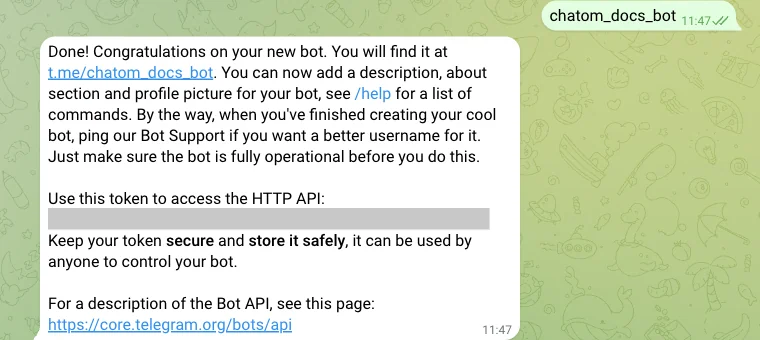
Open a chat with @BotFather and send /newbot. BotFather asks for a display name, then a username that ends in bot. Usernames are global, so try another if yours is taken.
BotFather replies with the bot’s token. Copy it into your secret store. If the token leaks, send /revoke to BotFather to replace it.
Turn off privacy mode
By default a bot in a group only receives commands that start with /, messages that mention it, and replies to its own messages. To let it read every message, send /setprivacy to BotFather, choose the bot, and select Disable.
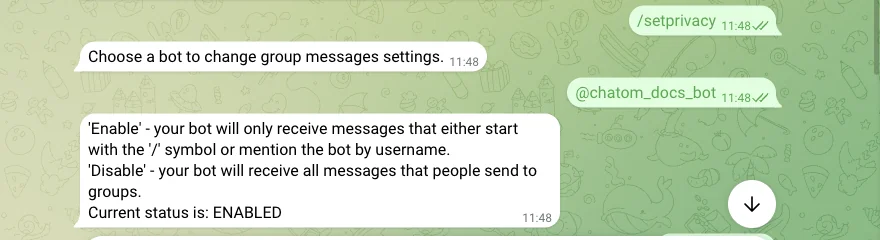
Telegram applies the change to groups the bot joins afterward. If the bot is already in a group, remove it and add it again. A bot that is a group administrator receives every message whatever this setting says.
Add the bot to a group
Open the group, select its name to open the group info, and add a member. Search for the bot’s username and confirm.
Find the chat id
Telegram has no API for looking up a private group by its title, so the examples need the group’s numeric chat id. A public group can use its @username instead.
With no other program polling for the bot’s updates, send a message in the group and run:
curl "https://api.telegram.org/bot$TELEGRAM_BOT_TOKEN/getUpdates"
The chat.id of the group’s message is the chat id. Group ids are negative, and supergroup ids start with -100.
Connect with Chatom
pip install chatom python-telegram-bot
import os

from chatom.telegram import TelegramBackend, TelegramConfig

backend = TelegramBackend(config=TelegramConfig(bot_token=os.environ["TELEGRAM_BOT_TOKEN"]))
fetch_channel(id=...) takes the numeric chat id. fetch_channel(name=...) finds a public group by @username, and a private group by title only once the backend has cached it. await backend.discover_chats() caches every chat in the bot’s pending updates.
Check the setup
export TELEGRAM_BOT_TOKEN=...
export TELEGRAM_TEST_CHAT_NAME=-1001234567890   # or the group's public @username

python -m chatom.examples.basic_connection --backend telegram
python -m chatom.examples.send_message --backend telegram
python -m chatom.examples.listen_for_messages --backend telegram --timeout 60
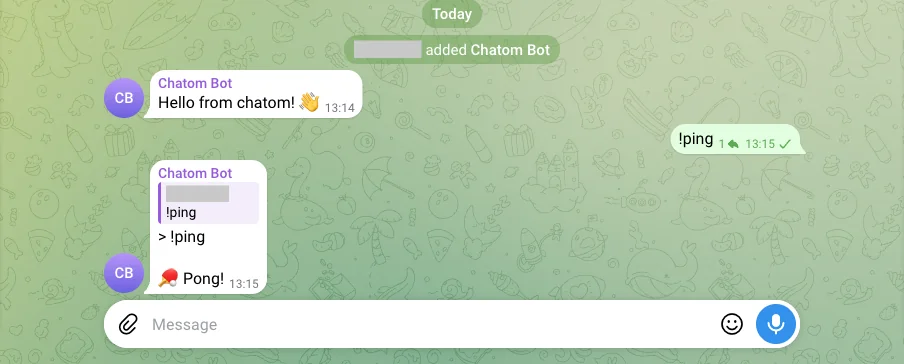
send_message posts a greeting in the group. While listen_for_messages runs, send !ping, !help, or !dm in the group and the bot answers. A bot cannot start a private chat, so !dm only works after you have opened a chat with the bot and sent it /start.